YT Manager — manage every YouTube channel from one place.
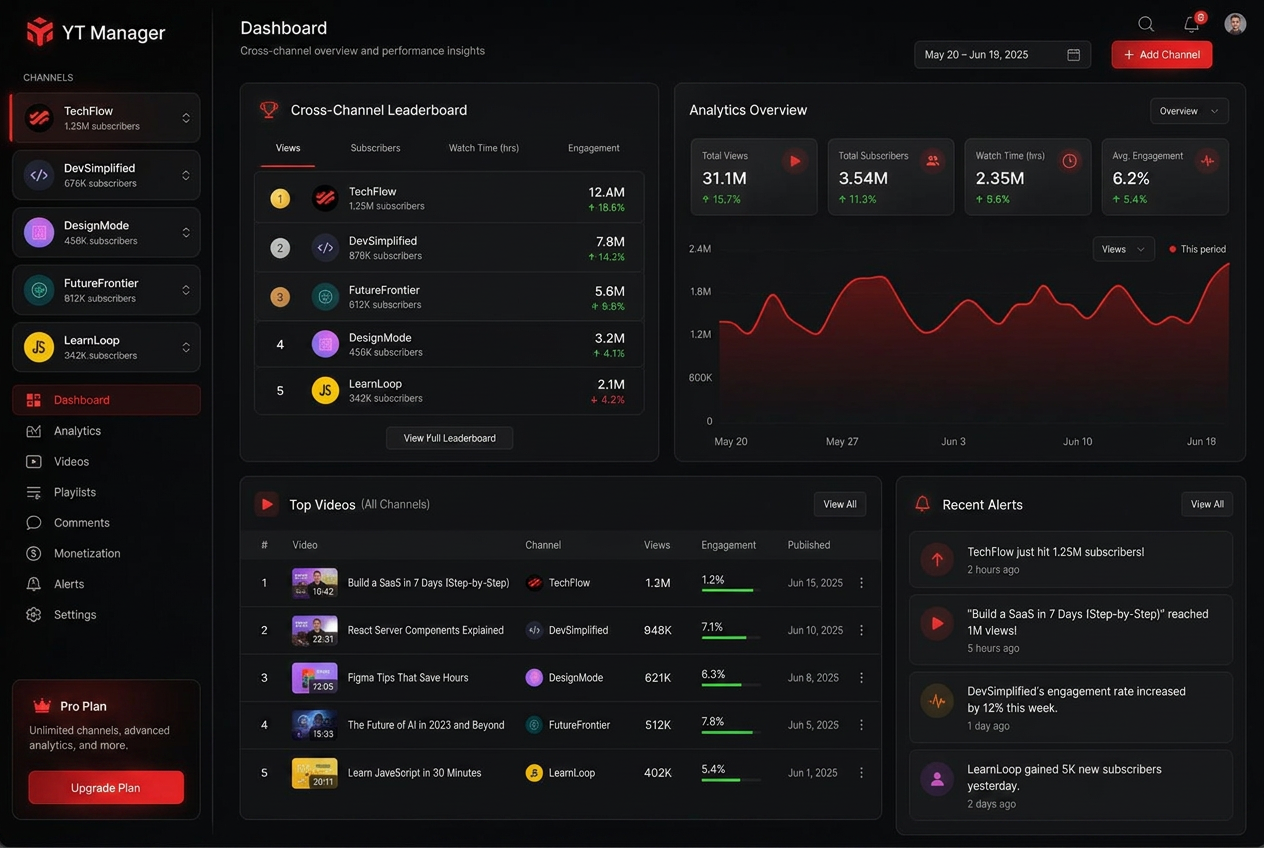
YT Manager is a YouTube channel management application for creators and agencies. Connect every channel, see unified analytics, compare performance side-by-side, and get one daily action plan — no more tab juggling or spreadsheets.
Start free, upgrade only when YT Manager saves you time
Connect one channel free, forever — no card, no countdown. Add more channels, AI coaching and longer history only when the unified view is saving you real time.
Cancel anytime · Read-only access to your analytics · No hidden charges
What is YT Manager?
YT Manager is a YouTube channel management application for creators and agencies. It brings every YouTube channel you own or manage into one dashboard so you can review performance, compare channels, monitor growth, and decide what to do next.
When you sign in with Google, YT Manager requests read-only access to the YouTube Data API and YouTube Analytics API. This lets the app display your channel statistics, including views, watch time, subscribers, impressions, click-through rate, estimated revenue, traffic sources, and audience data. YT Manager cannot post, edit, or delete videos, and we do not sell or share your Google data.
- youtube.readonly — displays the channels and videos you own inside your YT Manager dashboard.
- yt-analytics.readonly — displays views, watch time, subscribers, impressions, and traffic sources in analytics reports.
- yt-analytics-monetary.readonly — displays estimated YouTube revenue alongside channel performance.
You can disconnect a channel in YT Manager or revoke access from your Google Account at any time. Read our Privacy Policy and Terms of Service.
Your channels are scattered everywhere
YouTube Studio is built for one channel at a time. If you run two, three, or twenty, you spend more time switching accounts than growing them.
YouTube Studio shows you one channel at a time. YT Manager shows you the whole portfolio — so you know which channel needs attention and which one is winning.
The same creator, with and without a real manager
Juggling Studio accounts
- Log in and out of Google accounts every day
- Compare channels with copy-pasted spreadsheets
- Miss signals from the channels you checked least
- No single source of truth for your portfolio
Running YT Manager
- All channels synced in one dashboard
- Rank every channel by views, subs, watch time
- One daily action plan across your portfolio
- AI coach answers from your combined data
Managing multiple channels shouldn't be this hard
The most important part of scaling is also the hardest part to do inside YouTube Studio.
Studio tab switching
- Different Google accounts for each channel
- No way to see them side-by-side
Spreadsheet chaos
- Hours of exporting every week
- Out of date the moment you close it
Big teams have tools
- Internal dashboards you can't build
- Analysts you can't afford to hire
A generic AI chatbot can't manage your channel portfolio
- It has never seen your cross-channel leaderboard, retention curves, or cadence across all your accounts.
- You get the same ten tips whether you run one channel or twenty.
- No way to tell which channel the advice applies to — or whether it worked.
YT Manager's coach reads every connected channel before it answers. Every claim is tied to the channel and metric behind it.

A YouTube manager that does the busy work so you can focus on creating
All your channels in one dashboard
Connect every YouTube channel you own or manage — including Brand Accounts on different Gmail addresses — and see them in a single unified view.
Channel Leaderboard
Rank every channel against each other on views, subscribers, watch time and momentum. Perfect for weekly reviews and client calls.
AI Coach that knows your portfolio
Ask which channel needs attention, where to publish next, or for a full portfolio strategy. It answers from your synced metrics — not generic advice.
Growth Blocker Detector
Ten deterministic checks per channel — cadence, retention, momentum, hit dependency, discovery mix, sub conversion and more. Each blocker ships with the fix.
Top videos, Shorts vs. long-form
Separate leaderboards for videos and Shorts across all channels with comparative metrics, earnings estimates and one-click CSV export.
Trends & niche intelligence
See what's winning in your niche right now, analyse any channel, and score ideas before you spend a weekend filming them.
Weekly AI reports
A written performance recap across your portfolio — what moved, what broke, what to do next week.
Up and running in three steps
Connect all your channels
Sign in with Google and grant read-only YouTube Analytics access. You can connect multiple Gmail accounts and Brand Accounts — all under one YT Manager account.
We sync every channel
Up to 400 days of views, watch time, subscribers, revenue and video-level performance for each channel.
Manage from one place
Rank channels, compare performance, get cross-channel alerts, and ask the AI coach for a portfolio-level strategy.
What multi-channel operators say
Placeholder quotes — swap these for your own once you collect them.
"I used to open five YouTube Studio tabs every morning. Now I open YT Manager and see every channel in one leaderboard. Game changer."
"The cross-channel dashboard made me realize one channel was carrying 70% of my views. I fixed the others and doubled total watch time."
"The leaderboard view is how we run our weekly client calls. It replaced a spreadsheet nobody maintained."
"Managing two Brand Accounts used to mean logging in and out all day. Now both channels live in one dashboard."
Cheaper than a single hour of channel management busy work
Start free with one channel — no credit card, no countdown. Paid plans add channels, AI coaching and longer history.
Free
Free foreverOne channel, free forever. No credit card.
- 1 connected channel
- Unified analytics dashboard
- Top videos & Shorts breakdown
- 28-day analytics history
- All free creator tools
No credit card · No expiry
Starter
Free trialFor creators managing a few channels.
- Up to 3 connected channels
- Unified analytics dashboard
- Daily AI insights
- Growth blocker detection
- 30-day analytics history
No credit card required · Cancel anytime
Pro
Free trialFor creators who want actionable AI coaching.
- Up to 6 connected channels
- Advanced AI Coach
- Daily action plans
- Cross-channel comparisons
- 180-day analytics history
- Weekly AI reports
No credit card required · Cancel anytime
Agency
For agencies running large portfolios.
- Unlimited channels
- Team collaboration & roles
- Custom dashboards
- Unlimited analytics history
- White-label exports
Cancel anytime
Questions, answered
Connect your channels and take back control of your YouTube workflow
One dashboard, every channel, no more tab switching. Connect your first channel free today and see why creators call it their YouTube manager.
No credit card required · Cancel anytime · Read-only analytics access